Open-source tooling · 2026
Published
Repo Orientation Skills
- Claude Code
- Codex
- Node.js 18+
- Skill system
- record
- projects/claude-skills
- status
- published
- type
- open_source_tooling
- role
- solo -- author
- constraint
- bounded_write_scope
- stack
- Claude Code, Codex, Node.js 18+, Skill system
Two tools I use when starting work on a codebase I have not seen before. One structures how I orient before touching anything. The other generates a visual map I can walk a client through during scoping. Clearer than a folder tree, and no server required to open it.
Why I built this
Most of the work I do starts with a codebase I have never seen before. Legacy systems, inherited tools, custom CMS installs. The first real risk is not making the wrong change. It is not knowing what the system is quietly responsible for before you start. I needed a repeatable way to orient, and the output needed to be useful to the client, not just to me.
The visualizer came out of scoping conversations. Showing a client their project as a folder tree or a repo link does not communicate what the system actually looks like. A single HTML file they can open and explore does: what is large, what is connected, what looks like it accumulated over time. Both are open source because the problem is not unique to legacy systems.
The Problem
When a coding agent starts work in an unfamiliar repository, it has no protocol for what to read first or how confident its claims should be. It inherits descriptions from README files without verifying them against source. Stale docs, generated-vs-source drift, and undocumented lifecycle traps stay invisible until they cause a mistake.
The typical result is broad, guessy edits built on shallow context. The agent might read the right files eventually, but nothing enforces that it reads them in a useful order, labels what it does not know, or separates orientation from making changes.
For small, known, single-file edits this does not matter. For refactors, multi-file changes, or work in an unfamiliar area of a large repo, it does. Both skills are explicitly scoped to those cases and documented to be skipped for the rest.
What Was Built
codebase-orient is a skill that tells the agent what to read first, what uncertainty
to label, and what orientation artifacts to write. It reads project instruction files and
documentation before source code, verifies important claims against the actual codebase rather
than inheriting them from README files, and maps change surfaces such as routes, services,
auth, schema, UI, tests, and deployment as distinct areas. The output is three docs/ai/ files:
CODEBASE_MAP.md, CHANGE_SURFACES.md, and OPEN_QUESTIONS.md. Every inference carries an explicit
label: Fact, Strong inference, Weak inference, or Unknown.
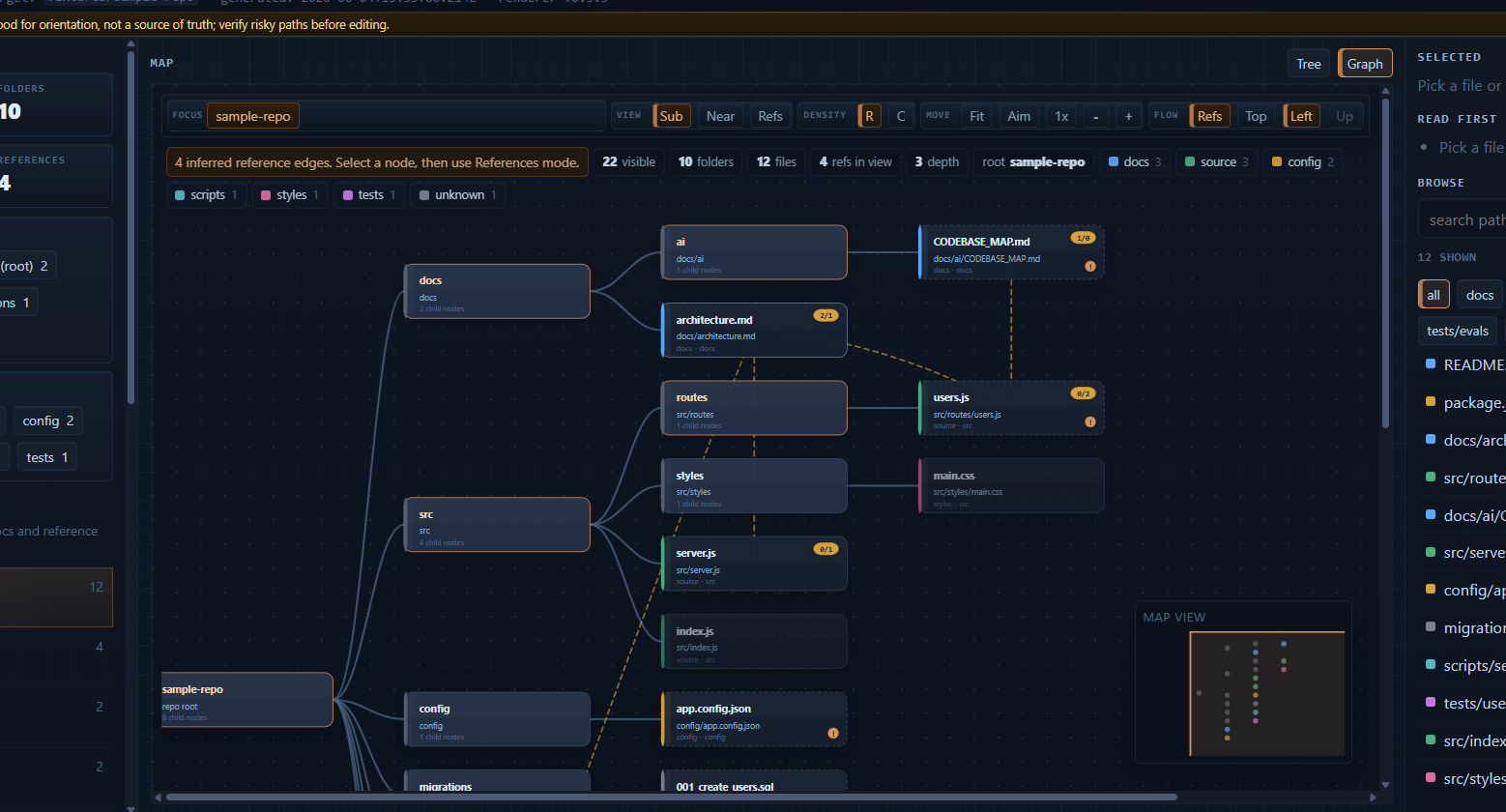
codebase-visualize is a sibling skill that scans the repository and produces
two generated artifacts: a structured graph JSON and a single self-contained HTML map. The
map renders tree and graph views, per-node risk and change-surface hints, search, filters,
and a copyable agent briefing. It runs with one Node.js command against a target path and
requires no server, no build pipeline, and no external runtime dependencies.
The two skills are designed as a pair. They share the same write boundary, install
model, and tool compatibility, with separate output namespaces so they compose cleanly. codebase-orient produces narrative docs with labeled uncertainty; codebase-visualize produces a structural map. Either works standalone. Together
they give an agent both a semantic understanding and a visual layout of the repo before broad
work begins.